帝国cms评论怎么做

dwz4年前帝国CMS2826

在帝国cms自带的评论和留言系统的功能上,简单修改一下它的样式就可以了。

修改内容页评论:

1、公共模板-评论js调用模板

1

2

3

4

5

6

7

8

[!--empirenews.listtemp--]

<div class="fb">

<ul>

<p class="fbtime"><span>[!--pltime--]</span> [!--username--]</p>

<p class="fbinfo">[!--pltext--]</p>

</ul>

</div>

[!--empirenews.listtemp--]

2、公共模板变量-管理公共模板-[!--temp.pl--] 找到评论表单

1

2

3

4

5

6

7

8

9

10

11

12

13

14

15

16

17

18

19

20

21

22

23

24

25

26

27

28

29

30

31

32

<script>

          function CheckPl(obj)

          {

          if(obj.saytext.value=="")

          {

          alert("您没什么话要说吗?");

          obj.saytext.focus();

          return false;

          }

          return true;

          }

          </script>

<form action="[!--news.url--]e/pl/doaction.php" method="post" name="saypl" id="saypl" onsubmit="return CheckPl(document.saypl)">

  <div id="plpost">

    <p class="saying"><span><a href="[!--news.url--]e/pl/?classid=[!--classid--]&amp;id=[!--id--]">共有<script type="text/javascript" src="[!--news.url--]e/public/ViewClick/?classid=[!--classid--]&id=[!--id--]&down=2"></script>条评论</a></span>来说两句吧...</p>

    <p class="yname"><span>用户名:</span>

      <input name="username" type="text" class="inputText" id="username" value="" size="16" />

    </p>

    <p class="yzm"><span>验证码:</span>

      <input name="key" type="text" class="inputText" size="16" />

      <img src="[!--news.url--]e/ShowKey/?v=pl" align="absmiddle" name="plKeyImg" id="plKeyImg" onclick="plKeyImg.src='[!--news.url--]e/ShowKey/?v=pl&t='+Math.random()" title="看不清楚,点击刷新" /> </p>

    <input name="nomember"  type="hidden" id="nomember" value="1" checked="checked" />

    <textarea name="saytext" rows="6" id="saytext"></textarea>

    <input name="imageField" type="submit" value="提交"/>

    <input name="id" type="hidden" id="id" value="[!--id--]" />

    <input name="classid" type="hidden" id="classid" value="[!--classid--]" />

    <input name="enews" type="hidden" id="enews" value="AddPl" />

    <input name="repid" type="hidden" id="repid" value="0" />

    <input type="hidden" name="ecmsfrom" value="[!--titleurl--]">

    </td>

  </div>

</form>

3、评论列表模板 -管理评论模板

1

2

3

4

5

6

7

8

9

10

11

12

13

14

15

16

17

18

19

20

21

22

23

24

25

26

27

28

29

30

31

32

33

34

35

36

37

38

39

40

41

42

43

44

45

46

47

48

49

50

51

52

53

54

55

56

57

58

59

60

61

62

63

64

65

66

67

68

69

70

71

72

73

74

75

76

77

78

79

80

81

82

83

84

85

86

87

88

89

90

91

92

93

94

95

96

97

98

99

100

101

102

103

104

105

106

107

108

109

110

111

112

113

114

115

116

117

118

119

120

121

122

123

124

125

126

127

128

129

130

131

132

133

134

135

136

137

138

139

140

141

142

143

144

145

146

147

148

149

150

151

152

153

154

155

156

157

158

159

160

161

162

163

164

165

166

167

168

169

170

171

172

173

174

175

176

177

178

<!DOCTYPE HTML PUBLIC "-//W3C//DTD HTML 4.01 Transitional//EN">

<html>

<head>

<meta http-equiv="Content-Type" content="text/html; charset=gb2312">

<meta name="viewport" content="width=device-width, initial-scale=1.0">

<title>[!--pagetitle--]</title>

<meta name="keywords" content="[!--pagekey--]" />

<meta name="description" content="[!--pagedes--]" />

<style type="text/css">

article { width: 800px; margin: auto }

<!--

body, Table { color: #222; font-size: 12px; }

a { color: #222; text-decoration: none; }

a:hover { color: #f00; text-decoration: underline; }

h1 { font-size: 32px; font-weight: bold; }

h2 { color: #1e3a9e; font-size: 25px; font-weight: bold; }

.you { color: #1f3a87; font-size: 14px; }

.text { font-size: 14px; padding-left: 5px; padding-right: 5px; line-height: 20px }

.re a { color: #1f3a87; }

.name { color: #1f3a87; }

.name a { color: #1f3a87; text-decoration: underline; }

.retext { background-color: #f3f3f3; width: 100%; float: left; padding-top: 22px; padding-bottom: 22px; border-top: 1px solid #ccc; }

.retext textarea { width: 90%; height: 130px; float: left; margin-left: 10px; border-top-style: inset; border-top-width: 2px; border-left-style: inset; border-left-width: 2px; }

.hrLine { BORDER-BOTTOM: #807d76 1px dotted; }

.ecomment { margin: 0; padding: 0; }

.ecomment { margin-bottom: 12px; overflow-x: hidden; overflow-y: hidden; padding-bottom: 3px; padding-left: 3px; padding-right: 3px; padding-top: 3px; background: #FFFFEE; padding: 3px; border: solid 1px #999; }

.ecommentauthor { float: left; color: #F96; font-weight: bold; }

.ecommenttext { clear: left; margin: 0; padding: 0; }

-->

@media only screen and (max-width: 800px) {

article { width: 100% }

}

</style>

<script src="[!--news.url--]e/data/js/ajax.js"></script>

</head>


<body topmargin="0">

<article>

  <table width="100%" border="0" align="center" cellpadding="3" cellspacing="1">

    <tr>

      <td><h1>网友评论</h1></td>

      <td><div align="right"><a href="#tosaypl"><strong><font color="#FF0000">我也评两句</font></strong></a></div></td>

    </tr>

  </table>

  <table width="100%" border="0" align="center" cellpadding="3" cellspacing="1" bgcolor="#222">

    <tr>

      <td height="2"></td>

    </tr>

  </table>

  <table width="100%" border="0" align="center" cellpadding="3" cellspacing="1">

    <tr>

      <td height="42"><h2>评论:<a href="[!--titleurl--]" target="_blank"><font color="#1e3a9e">[!--title--]</font></a></h2></td>

      <td><div align="right"><a href="[!--titleurl--]" target="_blank">查看原文</a></div></td>

    </tr>

  </table>

  <!--

<hr align="center" width="100%" size=1 class=hrline>

<table width="100%" border="0" align="center" cellpadding="3" cellspacing="1" bgcolor="#384EA3">

  <form action="../enews/index.php" method="post" name="infopfenform">

    <input type="hidden" name="enews" value="AddInfoPfen" />

    <input type="hidden" name="classid" value="[!--classid--]" />

    <input type="hidden" name="id" value="[!--id--]" />

    <tr>

      <td width="50%" height="27" valign="middle"><font color="#FFFFFF">&nbsp;评分:

        <input type="radio" name="fen" value="1">

        1分

        <input type="radio" name="fen" value="2">

        2分

        <input name="fen" type="radio" value="3" checked>

        3分

        <input type="radio" name="fen" value="4">

        4分

        <input type="radio" name="fen" value="5">

        5分

        <input type="submit" name="Submit" value="提交">

        </font></td>

      <td width="50%" valign="middle"><div align="center"><font color="#FFFFFF">平均得分:

          <strong><span id="pfendiv">[!--pinfopfen--]</span></strong> 分,共有 <strong>[!--infopfennum--]</strong>

          人参与评分</font></div></td>

    </tr>

  </form>

</table>

-->

  <table width="100%" border="0" align="center" cellpadding="3" cellspacing="1" bgcolor="#CCCCCC">

    <tr>

      <td height="30" bgcolor="#FFFFFF"><table width="100%" border="0" cellspacing="1" cellpadding="3">

          <tr>

            <td width="37%">&nbsp;&nbsp;&nbsp;网友评论</td>

            <td width="63%"><div align="right">[!--listpage--]&nbsp;&nbsp;&nbsp;</div></td>

          </tr>

        </table></td>

    </tr>

    <tr>

      <td bgcolor="#f8fcff"> [!--empirenews.listtemp--]

        <table width="96%" border="0" align="center" cellpadding="3" cellspacing="1" style="word-break:break-all; word-wrap:break-all;">

          <tr>

            <td height="30"><span class="name">[!--username--]</span></td>

            <td><div align="right"><font color="#666666">[!--pltime--]</font></div></td>

          </tr>

          <tr valign="top">

            <td height="50" colspan="2" class="text">[!--pltext--]</td>

          </tr>

          <tr>

            <td height="30">&nbsp;</td>

            <td><div align="right" class="re"><a href="#tosaypl"[!--includelink--]>回复</a>&nbsp; <ahref="JavaScript:makeRequest('../pl/doaction.php?enews=DoForPl&plid=[!--plid--]&classid=[!--classid--]&id=[!--id--]&dopl=1&doajax=1&ajaxarea=zcpldiv[!--plid--]','EchoReturnedText','GET','');">支持</a>[<span id="zcpldiv[!--plid--]">[!--zcnum--]</span>]&nbsp; <a href="JavaScript:makeRequest('../pl/doaction.php?enews=DoForPl&plid=[!--plid--]&classid=[!--classid--]&id=[!--id--]&dopl=0&doajax=1&ajaxarea=fdpldiv[!--plid--]','EchoReturnedText','GET','');">反对</a>[<span id="fdpldiv[!--plid--]">[!--fdnum--]</span>] </div></td>

          </tr>

        </table>

        <table width="100%" border="0" cellspacing="1" cellpadding="3">

          <tr>

            <td background="[!--news.url--]skin/default/images/plhrbg.gif"></td>

          </tr>

        </table>

        [!--empirenews.listtemp--]

        <div align="right"><br />

          [!--listpage--]&nbsp;&nbsp;&nbsp;<br />

          <br />

          <font color="#FF0000">网友评论仅供网友表达个人看法,并不表明本站同意其观点或证实其描述&nbsp;&nbsp;&nbsp;</font><br>

          <br>

        </div></td>

    </tr>

    <script>

  function CheckPl(obj)

  {

      if(obj.saytext.value=="")

      {

          alert("错误,评论不能为空");

          obj.saytext.focus();

          return false;

      }

      return true;

  }

  </script>

    <form action="../pl/doaction.php" method="post" name="saypl" id="saypl" onsubmit="return CheckPl(document.saypl)">

      <tr id="tosaypl">

        <td bgcolor="#f8fcff"><table width="100%" border="0" cellspacing="1" cellpadding="3">

            <tr>

              <td valign="middle">用户名:

                <input name="username" type="text" id="username" size="12" value="[!--lusername--]"/>


                <!--密码:

            <input name="password" type="password" id="password" size="12" value="[!--lpassword--]" />--></td>

            </tr>

            <tr>

              <td> 验证码:

                <input name="key" type="text" id="key" size="6" />

                <img src="[!--key.url--]" align="middle" name="plKeyImg" id="plKeyImg" onclick="plKeyImg.src='[!--news.url--]e/ShowKey/?v=pl&t='+Math.random()" title="看不清楚,点击刷新" />&nbsp;&nbsp;&nbsp;&nbsp;&nbsp;&nbsp;&nbsp;&nbsp;&nbsp;&nbsp;</td>

            </tr>

          </table></td>

      </tr>

      <tr>

        <td bgcolor="#f8fcff"><table width="100%" border="0" cellspacing="1" cellpadding="3" class="retext">

            <tr>

              <td width="78%"><div align="center">

                  <textarea name="saytext" cols="58" rows="6" id="saytext"></textarea>

                </div></td>

              <td width="22%" rowspan="2"><div align="center">

                  <input name="nomember" type="checkbox" id="nomember" value="1" checked="checked" />

                  匿名发表<br>

                  <br />

                  <input name="imageField" type="submit" id="imageField" value=" 提 交 " />

                </div></td>

            </tr>

            <tr>

              <td><div align="center">

                  <script src="[!--news.url--]d/js/js/plface.js"></script>

                </div></td>

            </tr>

          </table></td>

      </tr>

      <input name="id" type="hidden" id="id" value="[!--id--]" />

      <input name="classid" type="hidden" id="classid" value="[!--classid--]" />

      <input name="enews" type="hidden" id="enews" value="AddPl" />

      <input name="repid" type="hidden" id="repid" value="0" />

    </form>

  </table>

</article>

</body>

</html>
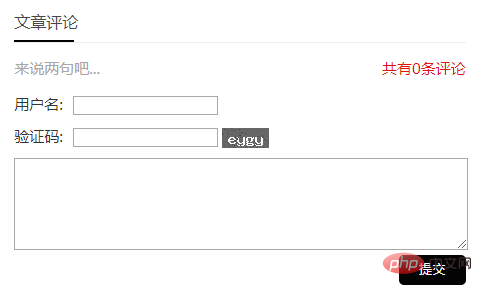
4、留言板 位置在:公共模板-留言板

头像图片存放在/e/tool/images/

1

2

3

4

5

6

7

8

9

10

11

12

13

14

15

16

17

18

19

20

21

22

23

24

25

26

27

28

29

30

31

32

33

34

35

36

37

38

39

40

41

42

43

44

45

46

47

48

49

50

51

52

53

54

55

56

57

58

59

60

61

62

63

64

65

66

67

68

69

70

71

72

73

74

75

76

77

78

79

80

81

82

83

84

85

86

87

88

89

90

91

92

93

94

95

96

97

98

99

100

101

<!doctype html>

<html>

<head>

<meta charset="gbk">

<title>[!--bname--]</title>

<meta name="keywords" content="[!--pagekey--]" />

<meta name="description" content="    [!--pagedes--]" />

<meta name="viewport" content="width=device-width, initial-scale=1.0">

<link href="[!--news.url--]skin/jxhx/css/base.css" rel="stylesheet">

<link href="[!--news.url--]skin/jxhx/css/m.css" rel="stylesheet">

<script src="[!--news.url--]skin/jxhx/js/jquery-1.8.3.min.js" ></script>

<script src="[!--news.url--]skin/jxhx/js/comm.js"></script>

<!--[if lt IE 9]>

<script src="[!--news.url--]skin/jxhx/js/modernizr.js"></script>

<![endif]-->

</head>

<body>

[!--temp.header--]

<article>

  <div class="whitebg">

    <h2 class="htitle">[!--bname--]</h2>

    <div class="news_infos m20">

      <div class="gbox">

        <form action="../../enews/index.php" method="post" name="form1" id="form1">

          <p> <strong>来说点儿什么吧...</strong></p>

          <p><span> 您的姓名:</span>

            <input name="name" type="text" id="name" />

            *</p>

          <input name="email" type="hidden" id="email" value="admin@qq.com"  />

          <p><span>选择头像:</span> *</p>

          <p> <i>

            <input type="radio" value= "../images/tx1.jpg" id= "1" name="mycall" style="display:none" selected>

            <img id="a" src="../images/tx1.jpg " onclick="myFun(this.id)"></i> <i>

            <input type="radio" value= "../images/tx2.jpg" id= "2" name="mycall" style="display:none">

            <img id="b" src="../images/tx2.jpg" onclick="myFun(this.id)"></i> <i>

            <input type="radio" value= "../images/tx3.jpg" id= "3" name="mycall" style="display:none">

            <img id="c" src="../images/tx3.jpg" onclick="myFun(this.id)"></i> <i>

            <input type="radio" value= "../images/tx4.jpg" id= "4" name="mycall" style="display:none">

            <img id="d" src="../images/tx4.jpg " onclick="myFun(this.id)"></i> <i>

            <input type="radio" value= "../images/tx5.jpg" id= "5" name="mycall" style="display:none">

            <img id="e" src="../images/tx5.jpg" onclick="myFun(this.id)"></i> <i>

            <input type="radio" value= "../images/tx6.jpg" id= "6" name="mycall" style="display:none">

            <img id="f" src="../images/tx6.jpg" onclick="myFun(this.id)"></i> <i>

            <input type="radio" value= "../images/tx7.jpg" id= "7" name="mycall" style="display:none">

            <img id="g" src="../images/tx7.jpg" onclick="myFun(this.id)"></i> <i>

            <input type="radio" value= "../images/tx8.jpg" id= "8" name="mycall" style="display:none">

            <img id="h" src="../images/tx8.jpg" onclick="myFun(this.id)"></i> </p>

          <p><span class="tnr">留言内容:</span>

            <textarea name="lytext" cols="60" rows="12" id="lytext"></textarea>

          </p>

          <p>

            <input type="submit" name="Submit3" value="提交" />

            <input name="enews" type="hidden" id="enews" value="AddGbook" />

                  <input name="bid" type="hidden" value="1" />

          </p>

        </form>

      </div>

      [!--empirenews.listtemp--]

      <div class="fb">

        <ul>

          <span class="tximg"><img src="[!--mycall--]"></span>

          <p class="fbtime"><span>

            <?=format_datetime($r[lytime],'Y-m-d')?>

            </span> [!--name--]</p>

          <p class="fbinfo">[!--lytext--]</p>

        </ul>

      </div>

      [!--start.regbook--]

      <div class="hf">

        <ul>

          <p class="zzhf"><font color="#FF0000">站长回复:</font>[!--retext--]</p>

        </ul>

      </div>

      [!--end.regbook--]


      [!--empirenews.listtemp--]

      <script>

  function myFun(sId) {


    var oImg = document.getElementsByTagName('img');


    for (var i = 0; i < oImg.length; i++) {

      if (oImg[i].id == sId) {

        oImg[i].previousSibling.previousSibling.checked = true;

        oImg[i].style.opacity = '1';

      } else {

        oImg[i].style.opacity = '.8';


      }

    }

  }

</script>

    </div>

    <!--newsinfo end-->


  </div>

</article>

<div class="clear"></div>

[!--temp.footer--]

</body>

</html>

5、css 增加以下css,jxhx的路径在 /skin/jxhx/css/base.css

/* 以下图片存放在skin/html/images */

1

2

3

4

5

6

7

8

9

10

11

12

13

14

15

16

17

18

19

20

21

22

23

24

25

26

27

28

29

30

31

32

33

34

35

36

.saying { line-height: 30px; color: #a9a6a6; }

.saying span { float: right }

.saying span a { color: #de1513; }

img#plKeyImg { display: inline-block; }

.yname { margin: 10px 10px 10px 0 }

.yname span, .yzm span { padding-right: 10px; }

.yzm { margin: 0 10px 10px 0 }

.gbox input[type="submit"] { display: block; background: #303030; color: #fff; border: 0; line-height: 30px; padding: 0 20px; border-radius: 5px; float: right; }

#plpost textarea#saytext { width: 100%; }

#plpost input[type="submit"] { display: block; background: #040404; color: #fff; border: 0; line-height: 30px; padding: 0 20px; border-radius: 5px; float: right; }

.gbox { padding: 0; overflow: hidden; }

.gbox p { margin-bottom: 10px; overflow: hidden; }

p.fbtime { color: #000; }

.fbtime span { float: right; color: #999; font-size: 12px; overflow: hidden; white-space: nowrap; }

p.fbinfo { margin: 10px 0; }

.fb ul { margin: 10px 0; padding: 20px 10px; border-bottom: #ececec 1px solid; }

span.tximg { display: block; float: left; margin-right: 10px; }

.gbox i { display: block; float: left; margin-right: 10px; }

.gbox i input { margin: 10px auto; display: block; }

.hf ul { padding: 10px 10px; background: #f9f9f9; }

.hf { padding-bottom: 20px; border-bottom: #dedddd 1px dashed; }

textarea#lytext { width: 99%; }

.gbox input[type="submit"] { display: block; background: #040404; color: #fff; border: 0; line-height: 30px; padding: 0 20px; border-radius: 5px; float: right; }

.ecomment { border: #dedcdc 1px solid; padding: 10px; margin-bottom: 10px; }

span.ecommentauthor { color: #b5b5b5; font-size: 14px; margin-bottom: 5px; display: block; }

.gbook .fb ul { margin: 10px 10px; padding: 10px 10px 10px 70px; border-bottom: #ececec 1px solid; }

.gbook .fb:nth-child(8n-7) ul { background: url(../../../e/tool/images/tx10.jpg) no-repeat top 20px left 10px; }

.gbook .fb:nth-child(8n-6) ul { background: url(../../../e/tool/images/tx9.jpg) no-repeat top 20px left 10px; }

.gbook .fb:nth-child(8n-5) ul { background: url(../../../e/tool/images/tx8.jpg) no-repeat top 20px left 10px; }

.gbook .fb:nth-child(8n-4) ul { background: url(../../../e/tool/images/tx7.jpg) no-repeat top 20px left 10px; }

.gbook .fb:nth-child(8n-3) ul { background: url(../../../e/tool/images/tx6.jpg) no-repeat top 20px left 10px; }

.gbook .fb:nth-child(8n-2) ul { background: url(../../../e/tool/images/tx5.jpg) no-repeat top 20px left 10px; }

.gbook .fb:nth-child(8n-1) ul { background: url(../../../e/tool/images/tx4.jpg) no-repeat top 20px left 10px; }

.gbook .fb:nth-child(8n) ul { background: url(../../../e/tool/mages/tx3.jpg) no-repeat top 20px left10px; }

.gbook .fb:first-child ul { background: url(../../../e/tool/images/tx2.jpg) no-repeat top 20px left 10px; }

.gbook .fb:last-child ul { background: url(../../../e/tool/images/tx1.jpg) no-repeat top 20px left 10px; }

1.jpg

6、将压缩包下载,分别传到/e/tool/images/ (没有目录就创建目录)

7、修改内容模板

1

2

3

4

5

6

7

<div class="whitebg gbook">

  <h2 class="htitle">文章评论</h2>

  <ul>

<script src="[!--news.url--]e/pl/more/?classid=[!--classid--]&id=[!--id--]&num=20"></script>

[!--temp.pl--]

  </ul>

</div>

8、修改完以后,刷新内容页,动态页面。


相关文章

帝国cms如何播放视频

帝国cms如何播放视频

帝国cms如何播放视屏,相信很多人都遇到过这种问题,其实帝国cms有自带的视屏播放插件,只需要加载它的js文件,在直接调用函数就行了。下面就为大家,详细介绍一下该函数该如何使用。推荐教程:帝国cms教...

帝国cms常用的几个标签是什么

帝国cms常用的几个标签是什么

帝国cms常用的几个标签:灵动标签[e:loop={'73',1,0,1,'','id desc'}] [/e:loop]链接:<?=$bqsr[...

帝国cms系统怎么换文章展示的标题图片

帝国cms系统怎么换文章展示的标题图片

帝国cms系统换文章的展示标题图片方法如下:1、首先登录到帝国CMS的系统后台,进入操作界面。先找到对应的文章的栏目,在系统的信息管理里面。2、然后右边的具体文章处点击修改,如图所示。3、在标题图片里...

帝国cms怎么加水印

帝国cms怎么加水印

帝国cms怎么加水印首先登陆帝国cms后台,然后找到参数设置-图片设置,接着就可以添加文字水印或者图片水印。帝国后台设置水印的地方如下图:其中图片水印的默认地址为:/e/data/mark/maskd...

帝国CMS如何更改绑定域名

帝国CMS如何更改绑定域名

(1)、域名控制面板里设置解析到服务器IP(2)、服务器里设置绑定域名到栏目目录(apache/iis里设置)(3)、修改栏目填写绑定的域名地址(父栏目要勾选绑定域名应用于子栏目),绑定地址比如:ht...

帝国cms怎么加自定义页面

帝国cms怎么加自定义页面

一、自定义页面功能说明   自定义页面功能:也就是我们常说的增加单页,比如增加“关于我们”、“联系我们”等单页页面。自定义页面的页面模式支持两种方式:1、直接页面式:直接编辑整个页面界面的...

发表评论    

◎欢迎参与讨论,请在这里发表您的看法、交流您的观点。